How to check your PHP version in WordPress
If you’re reading this in October 2026, you’ve likely heard about the recent vulnerabilities in PHP that caused thousands of websites to be turned off as a preventative measure.
These caused issues for WordPress sites, but also for any CMS that uses PHP: Drupal, Magento, Craft, Joomla, etc.
PHP has released a security update, and it’s one you should act on immediately.
If you are a retainer client of ours, your site is already patched and secure.
PHP is the programming language WordPress is built on. An out-of-date version of PHP can leave your site at risk of security problems, so it’s worth checking every now and then.
The good news? If you’re using WordPress, you can easily check the PHP version in a couple of clicks.
Before you start
You’ll need:
- An administrator account on your WordPress site
- WordPress 5.2 or later. If your site is running an older version of WordPress, you won’t be able to check the PHP version, and updating WordPress should be your first job.
Not sure which version of WordPress you’re on? Go to Dashboard > Updates and it’ll tell you.
How to check your PHP version
- Log in to your WordPress dashboard.
- Go to Tools > Site Health.
- Click the Info tab.
- Open the Server section.
- Look for PHP version. You’ll see a number like
8.3.36.
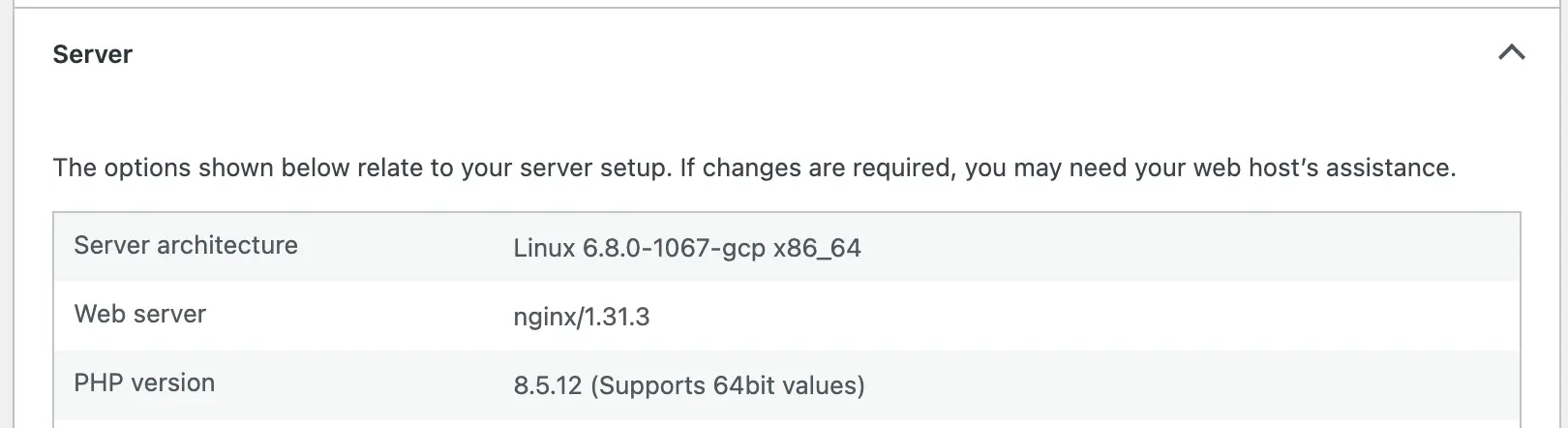
While you’re there, have a look at the Status tab too. If your PHP version is out of date, WordPress will flag it as a recommended improvement.
Which version should you be running?
Each PHP version gets security fixes for four years, then it reaches “end of life” and stops getting fixes. As of October 2026, these are the supported versions:
| PHP version | Security support ends | You should be on at least |
|---|---|---|
| 8.5 | 31 December 2029 | 8.5.12 |
| 8.4 | 31 December 2028 | 8.4.27 |
| 8.3 | 31 December 2027 | 8.3.36 |
| 8.2 | 31 December 2026 | 8.2.35 |
A few things to bear in mind:
- Anything older than 8.2 (8.1, 8.0 or any 7.x version) no longer gets security updates from PHP.
- PHP 8.2 reaches end of life on 31 December 2026, so if you’re using 8.2, now’s a good time to plan an upgrade.
- WordPress recommends PHP 8.3 or newer. If you’re upgrading anyway, we recommend 8.4 or 8.5.
What if you have an older version of PHP?
Don’t panic. Some hosting providers apply security fixes to older versions themselves, so if you have an older version that listed above (e.g. 8.5.11 or 8.4.26), it's possible your site is still secure.
If your version is older than the ones above, contact your host and ask:
- Which PHP version is my site running?
- Has it been patched for the October 2026 PHP security release?
- Can you move my site to PHP 8.4 or 8.5?
Upgrading PHP can occasionally break older themes and plugins, so ask whether they can test the change on a staging copy of your site first.
Need a hand?
If you’d like help checking your site or planning a PHP upgrade, get in touch. I’m always happy to take a look.